Showing posts with label Apps. Show all posts

How to protect your Android phone from viruses

Tuesday, October 6, 2015
Simple and free steps to ensure your smartphone is secure and virus free.


Samsung phone running Lookout

Android is currently the UK’s most popular operating system. So, if you own a modern handset made by a well-known company such as Samsung, Motorola, LG or Sony, the chances are that it runs a version of Google’s Android operating system.
You wouldn’t dream of leaving a Windows desktop or laptop computer without virus protection, and nor should your Android smartphone be left exposed to infection.
Of course, you might not think of your smartphone on the same terms as a computer but modern Android devices are powerful mini-computers.
Android is considered an ‘open’ operating system, which essentially means that smartphone manufacturers are free to change it to make it work just the way they want and anyone can develop and release apps for it. This means it is more prone to viruses than other mobile operating systems.
Fortunately protecting your Android handset is straightforward - and free. Read on to learn how to block all types of mobile malware

Step 1: Update your Android
Android software update

It’s important to keep your Android software up to date.  As well as new features, each update includes bug fixes to help protect your phone.
Tap the Settings icon, then scroll down to the System section and tap the About option followed by System update. Now tap the Check Update button.
If an update is found, follow the prompts to download and install it.

Step 2: Prevent installs from unknown sources

Prevent installs from unknown sources


Read more ...

Convert .apk files to .jar files

Saturday, August 16, 2014


Download .apk file from market

  • Download any app from the Android Market [Go]
  • Install Astro File Manager from Android Market [Go]  
  • Open Astro > Tools > Application Manager/Backup and select the application to backup on SD card.
  • Mount the phone as USB and access 'BACKUPAPPS' folder to find the apk of targetapp.(lets call this targetapp.apk).
  • Copy it to your hard disk.

Decomiling apk to Dex format

  • Download Dex2Jar [GO] 
  • Android runs applications which are in Dalvik Executable (.dex) format.
  • Run the following command to convert apk to jar.
dex2jar targetapp.apk file(./dex2jar targetapp.apk on terminal)
                                                 File 'targetapp.apk.dex2jar.jar' is created
[Click to Enlarge]

Viewing/Decompiling the Jar files to Java


Method 1 : Use JavaDecomiler (JD)

  • Open 'targetapp.apk.dex2jar.jar' with jd-gui [Click to Download]  
  • File > Save All Sources to save the class files in jar to java files.
Method 2 : JAD
  • Extract contents of jar file on to a folder named src.  Use and unarchival utility like 7zip.
  • Keep 'src' folder in the same directory where JAD and targetapp jar is present.
  • Open JAD in cmd and execute the following command
jad -o -r -sjava -dsrc src/**/*.class (./jad on terminal)


Now src will contain decompiled Java files ready for manual code review.


Enjoy :)

Read more ...

How to edit android apps(APK Files)

Wednesday, July 23, 2014
You want to edit apk file(android app) directly without the need of eclipse or command line build utility? Yes You can do it using APK Edit Utility.

Steps 

(1) Download APK Edit Software from here. Download apk edit software 


(2) Unzip the zip file and extract its contents. Click on "APK Edit.exe".

(3) First it will ask you to choose Java Executable from "Program Files" folder. Normally it resides in "C:\Program Files (x86)\Java\jdk1.6.0_25\bin". Folder may be different if you have different java version installed or different bits operating system.


apk-edt-choose-java-directory

(4) Later software will ask you to choose android apk file you want to edit. Browse the apk file you want to edit.
apk-editor-choose-apk-file

(5) Wait for some time until the Browse link becomes clickable in Details Tab.

apk-edit

(6) Now, click on browse and folder structure will be opened.
(7) You can make small changes like string name change, image change, app name change & save the file to reflect the changes in apk file.

apk-edit-change-image


To Change icon or images :- Replace existing images with new images.
To make string changes :- find strings.xml file in res and change the string’s values.
To make app name, package name changes :- Change the android manifest file.

After making all changes, save the file and close the folder structure.  Click On Ok and you will see the android app with all the changes you made.


apk-editor-for-android


Source :- technonutty

Read more ...

The Best Free Android Games from Last Week

Sunday, July 13, 2014

It’s time to checkout and Download the Best Free Android Games from last Week.

Every week we try to give you a list of best android games chosen from the arrivals in the past week on Google Play Store. Here is our choice for this week’s best in Android games. Enjoy them and don’t forget to use the share buttons to let your friends know your current Android Gaming!

THE WALKING DEAD: SEASON TWO

The Walking Dead android game
The second episode of the famous series of novels by zombies, The Walking Dead is now available for Android that will transport you to an apocalyptic world full of zombies ready to devour humanity. In this new release you can continue with the story of Clementine in the search for security in a world where zombies have emerged from the overnight invading and destroying a lot of the world’s population. You must learn to fend for the young orphan girl and will be forced to survive in an unforgiving world. Experience how it feels to play as Clementine in this new release, meeting the survivors, explore new places and make horrible decisions in this game on its five chapters.

DRAGON FINGA


Dragon Finga for Android is a unique Kung-Fu fighting game and the goal is as simple as driving to your warrior and do compete in hordes and hordes of enemies that you find in over 250 missions, trying to see how long you can last and how much can accumulate score before time runs out or you die. You can improve the powers of the protagonist or unlock new scenarios that carry out combat. A simple game, but very attractive and well made.

TRANSFORMERS AGE OF EXTINCTION

TRANSFORMERS AGE OF EXTINCTION android game
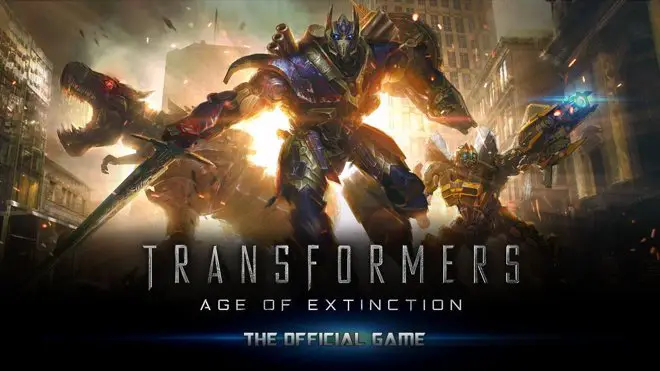
Transformers Age of Extinction is the official game of the new installment of the series Transformers for Android that comes with a combination of runner and combat that makes it a really exciting game. This is a game of endless race, where you have to destroy everything that is put in your way with the help of an arsenal also quite considerable. You have a wide range of transformers at your disposal to choose from that you can evolve and customizing. If you like speed and destruction, this is your game.

SIMON THE SORCERER 2


Simon The Sorcerer 2 transports you to a magical world where you will a fun adventures for you and your goal is to save the wizard Calypso. Get through the spell book, browse the world awaits you and defeat various enemies. You have to touch things to interact with them and others, and the gaming experience is exactly the same as you might find in your computer.

RALLY RACER DRIFT

Rally Racer Drift android game
A set of races dedicated to recreating the experience of driving the rallies, with a special emphasis on a realistic simulation of the skids. As always, you have a wide variety of cars and tracks at your disposal, plus a multiplayer mode to show your driving skills.

DEFENDERS


Defenders for Android is a new game for Android in the genre of tower defense and your goal is to defend your castle from countless hordes of enemies that threaten it, with the help of various types of towers and spells. The game features stunning 3D graphics with amazing effects, more than 26 upgradable towers with 13 kinds of spells and you can share your progress with your friends through Facebook.

THE RHYTHM OF FIGHTERS

Unleash your favorite special moves and combos following the frenzied rhythm! The goal is to keep up with songs while actions are performed on the screen allowing the character to perform combos and special attacks. The controls are very simple and easy to learn, the gameplay is designed to take advantage of mobile devices, combining the style of games like ‘Guitar Hero’ titles with classic fights.

BARDADUM: THE KINGDOM ROADS

Bardadum: The Kingdom Rods is a puzzle game in which your goal is to lead the characters to their respective objects. To do so, you must drag them toward what they need, without for that path intersects with that of other people.

ZOMBIE KILLER

Zombie Killer game for android
Humanity is hit by a terrible virus that turns people into zombies. You have to clear the city of bloodthirsty monsters. Zombie Killer for Android is an addictive game where you have to be very fast so that no zombies invade your screen. Zombie Killer does not bring any big news about atmosphere or gameplay, but the quality of its graphics and fluidity of the controls make him a very interesting option.
Hopefully, you will enjoy playing these best free android games from last week. Recommend your favorite android games of the week in the comment section below. 


Source :- getandroidstuff

Read more ...

30 best free iPhone apps 2014

Saturday, July 12, 2014
90 best free iPhone apps 2014


There are now hundreds of thousands of apps available for your iPhone 5S, iPhone 5C, iPod touch and iPad, and, surprisingly, many of the best are free.
The following list showcases our pick of the 90 best free iPhone apps, and includes iPhone applications for social networking, travel, news, photography, productivity and more.
Most of these apps are also suitable for the iPod touch.
If your top free iPhone apps aren't covered, tell us all about them in the comments.

1. Facebook

The world's biggest social network brings a tightly honed experience to the iPhone and iPod touch, but nonetheless still enables you to access your contacts, feeds and other important information. This sense of focus makes it in many ways superior to using Facebook in a desktop browser.
Facebook

2. PhotoSynth

We did a bit of a double-take on seeing Microsoft's name attached to this, not least given the lack of a price-tag. But PhotoSynth is a really great panorama app; it's user-friendly and fun to use, especially when watching your panoramas take shape while you capture them. (The iOS Camera app also has a panorama mode, but PhotoSynth's more flexible and works with older devices.)
photosynth

3. RunKeeper

The prospect of Nike+ but better and for free might sound unlikely, but that's what RunKeeper provides. Previously split into 'pro' and 'free' versions, the developer now generously includes all the features in one free app.
That means you can spend no money, yet use your iPhone's GPS capabilities to track your jogging and cycling routes, and examine mapping and details of your pace and calories burned. Activities can be shared online, and treadmill runs and other exercise details can be entered manually.
runkeeper

4. LinkedIn Pulse

RSS has a reputation for being a rather dry technology, feeding you dull lists of headlines. Pulse flips RSS on its head, providing streams of feeds that grab your eye with photographs. It's perhaps not for the hardcore RSS crowd, but if you follow a small number of feeds, it's a great choice.
linkedin pulse

5. Dropbox

Plenty of apps exist for transferring content between your computer and your device, but Dropbox is free and easier to use than most of its contemporaries. Dump files you want to sync in a folder on your computer and Dropbox for your device will enable you to access them, download them for offline viewing, and, in many cases, view them.
dropbox

6. National Rail Enquiries

For anyone commuting by train, National Rail Enquiries is a handy app to have installed. There's journey planning, timetables and a location-aware 'next train home' option, along with progress tracking, so you can see when a train's likely to show up. It's not as usable nor as pretty as UK Train Times, but it is broadly similar - and five quid cheaper.
National Rail Enquiries

7. Skype

FaceTime is a great alternative to standard voice calls, but it's no good if you're trying to contact someone without a Mac or compatible iOS device. Therefore, Skype remains an essential download. The interface is simple and usable, enabling anyone with a Skype account to make free calls to other Skype users and cheap calls to anywhere in the world. If you're on Pay and Go, this is particularly handy, but the app also enables iPod touch users to utilise their devices for calls.
Skype

8. Movies by Flixter

Although some aspects of cinema listings app Movies by Flixter are disappointingly US-centric (notably regarding details on upcoming movies and DVDs), it succeeds where it matters. Select a film and the app figures out where you're located, lists nearby cinemas, and displays times your chosen film is showing. Efficiency can be further increased by pinning favourite cinemas to the top of the list.
movies

9. TonePad

Virtual pianos and guitars are all very well, but purely digital musical toys are more suited to Apple handhelds. TonePad is the best of them, using a grid-based interface that enables you to turn notes on and off and compose pleasing and harmonious loops; your creations can be edited, saved and uploaded to share with other users.
tonepad


10. Thomson Reuters News Pro

There are many free news apps, but Reuters News Pro offers a breadth of coverage that makes it a winner. Preferences enable you to tailor the app's output to the UK, and the toolbar provides swift access to news, pictures, videos and stock markets coverage.
Reuters

11. Twitter

The official Twitter app might lack some of the features found in the likes ofTweetbot, but it does provide a sleek and simple means of using the service. It also rapidly rolls in new features from the website, such as the Connect and Discover views, along with expandable tweets that contain photos and videos.
Twitter

12. Comics

In all honesty, Comics is a little awkward compared to using it on an iPad, but you won't find a better comics experience on an iPhone. The app is free, as are dozens of downloadable comics - and once you run out of those, many more are available to buy. Reading works on a frame-by-frame automated 'zoom' basis, and is surprisingly usable.
Comics

13. Wikipanion

The Wikipedia website works fine on iPhones, but a dedicated app is a better bet. Wikipanion is a freebie which gives you quick access to article sections, in-article search, viewing options, bookmarking, and the ability to tweet about whatever odd fact you've just unearthed. Also, wonderfully, there are no ads.
Wikipanion

14. Evernote

Clients to access the popular Evernote service for storing notes and ideas online are available for so many platforms that we half expect a ZX Spectrum app to be announced tomorrow. On the iPhone, Evernote is efficient and usable, enabling you to rapidly scan your notes and also create new ones.
Evernote

15. Kindle

With iBooks on the iPhone, you might wonder why you should bother with Amazon's Kindle. After all, the app's not as pretty as iBooks, nor is there an integrated store (you buy in Safari and sync purchases to the app). However, Kindle offers a massive selection of books compared to Apple's app and the reading experience is great.
Kindle

16. Around Me

Around Me figures out where you are and lists local stuff - banks, bars, petrol stations and, er, Apple Retail Stores. The app's reliance on Google Maps info means there are gaps, but it's nonetheless handy to have installed when in unfamiliar surroundings, and the 'augmented reality' landscape mode is amusing, if flaky.
around me

17. Dictionary.com - Dictionary & Thesaurus

Over two million definitions, synonyms and antonyms are available in the palm of your hand with this free, offline dictionary and thesaurus. The app is fast and efficient, includes phonetic and audio pronunciation of words, and its interface seems perfectly suited to the iPhone.
dictionary


Air Video Free can stream (and convert as necessary) video from any computer running the free Air Video Server. You only get access to a small number of items per folder or playlist, but some careful planning can get around that limitation.
Air Video Free

19. Adobe Photoshop Express

If you're looking for Photoshop-style power, Photoshop Express won't impress. However, if you're after a quick, free, highly usable tool for making edits to your iPhone photos, Adobe's app is ideal. Use it for cropping, straightening, exposure adjustments, colour effects, sharpening and more.
photoshop express


20. iHandy Level Free

One of the tools from the excellent iHandy Carpenter toolkit app, iHandy Level Free turns your iPhone into a spirit level. By default, it'll show just how wonky your device's accelerometer is, but tap the calibrate button and you get an accurate and great-looking level.


21. Pocket
The service formerly known as Read It Later enables you to save pages from websites, to read them later, bereft of the advertising and other junk on the original page. The service is free, as is the Pocket app, which downloads your articles, so that you can digest them without a web connection.
Pocket

22. PCalc Lite

"But I've already got a calculator on my device," you might argue. True, but we'd recommend stashing the default Apple app in a folder and replacing it with PCalc Lite. The reason: this is without doubt the finest free calculator for iOS, with a great interface and plenty of options. You can also bolt-on features from the paid version via in-app purchases.
PCalc

23. iBooks

Effectively iTunes for books, the app combines a reader and store, in Apple's typically usable and integrated fashion. Usefully, iBooks includes PDF support and bookmarks automatically sync across devices.
ibooks

24. Tumblr

Tumblr has managed to carve itself a niche, sitting somewhere between blogs and Twitter. The iPhone app is very nice indeed, providing a sleek browsing experience, and also a straightforward means of uploading text, photos and videos to your Tumblr account.
tumblr

25. eBay

On using the eBay app, there's a good chance you won't go near the eBay website again. The app is fast, has great saved searches (which flag new finds), and enables you to create listings. The last of those things is also improved by the built-in bar-code scanning.
eBay

26. Tube Map London

At its most basic, Tube Map London is a London Tube map on your device, for free. In landscape, even the ads get out of your way, which is rather nice. And if you've a web connection, the app also provides live board info, a station finder and a route calculator.
tube map

27. Google Earth

"Hold the world in the palm of your hand," says Google about Google Earth, which enables you to fly across the planet by swiping your finger. More integration with content and features from Maps would be good, but Google Earth's Wikipedia articles and a Panoramio layer at least ensure it's a great app for seeing the world from your living room.
google earth

28. XE Currency

XE Currency is a fine example of an app that does what it needs to, without fuss. You configure a list of currencies, and it shows current conversion rates. Double-tap a currency to set its base rate or to define values for custom conversions.
XE Currency

29. Shazam

Shazam is an app that feels like magic when you first use it. It's deceptively simple—hold your iPhone near to a music source, and wait while the app listens and tells you what track is playing. But the sheer technology behind this simplicity is mind-boggling, and while Shazam doesn't always guess right, it's worth a download.
Shazam

30. Bump

Once a contender for the 'surely, that's witchcraft?' award, Bump enables you to select up to four contacts, then 'bump' your device into another iOS device running Bump to transfer details, or to compare contacts. Its thunder has been stolen somewhat by Apple's AirDrop, but it'll be a while before that technology is ubiquitous on iOS.
Bump


Source :- techradar.com

Read more ...

Top 10 New Android Apps of the Week

Saturday, July 12, 2014
sonicjumpfever1
Welcome to another utterly beloved segment of the Good e-Reader Top 10 New Android Apps of the Week! Every week close to 45,000 new Android apps are submitted to major app stores and this makes app discovery a bit of a pain. Today, we look at the best new ones that you should know about.
Guess The Emoji – Are you ready for a guessing game like none other?! Guess The Emoji will entertain you for hours! Our new kid and family friendly game tests your logic and reasoning skills to solve simple (and sometimes hard!) Emoji Puzzles! You’ll be presented with a screen displaying some emojis – what is it that these emoticons are describing?! Can you guess them all?
LINE Selfie Sticker – LINE Selfie Sticker, the first-ever official sticker making app from LINE is here! From the cute and cuddly LINE characters to career-driven independent women, this app has it all! Cheerleaders, Wedding, Pirates, monsters, and more – with over 130 free character templates to choose from, you’ll find yourself using this app over and over again.
Disney Bola Soccer – Do you have what it takes to WIN? Play solo or against your friends in this ultimate soccer adrenaline rush and prove that you’re the champ!
Fit the Fat - Master your skills in this fun new game and help this fat guy lose weight by jumping the rope. Fit the Fat is very simple: tap and jump the rope. You will get fit and the rope will get fast.
Super Écran GO – With Super Screen GO, enjoy instant and unlimited access to over 300 hours of premium content in high definition, anytime, anywhere! Access a database of more than 150 films including hits Hollywood, acclaimed Canadian productions, as well as exclusive series including the prestigious series HBO and showtime. Super Screen GO is accessible from your phone or tablet.
Tempo Mania - Simple yet addictive music game! Are you tempo master? Experience the exciting game and enjoy the music at the same time!
Sonic Jump Fever – Catch the FEVER in an explosive race against the clock! Compete with Sonic and friends in high-speed bursts of vertical jumping mayhem. FREE and based on SEGA’s hit Sonic Jump. Prove you are the best. Rack up huge combos to blast past your friends’ high scores. Use boosters, upgrades, unique character abilities to maximize your score. Then kick into overdrive with Fever Mode and hit the top of the Leaderboard!
Tour de France Live – 2014 – The 2014 Tour de France will be the 101st edition of the Tour de France. The 2014 Tour de France starts in Leeds on Saturday, July 5 and finishes in Paris on Sunday, July 27.
Commandr for Google Now - Now you can use Google Now to control your flashlight, toggle settings, control music playback, and much more!
Theftie – Find my phone – Theftie: lock, locate, track, rescue data on your lost phone, stolen phone or misplaced Android, and takes thief’s selfie when suspects. A great feature of Theftie is its ability to send your data to your Google Drive in case you lost your phone.
Source :- goodereader.com
Read more ...