Showing posts with label Software. Show all posts

[How To] Use A Video As Your Android Phone’s Live Wallpaper

Monday, May 26, 2014
The days are long gone when portable devices like phones had a tough time playing videos. Most phones today come with the capability 1080p video playback, something which has been made possible only because of the immense growth in the hardware of phones. Most phones come with 1GB of RAM today, and 512MB is seen as bare minimum by today’s tech-savvy youth.Ever since Android introduced the concept of ‘live’ wallpapers, users always wanted to have their favourite video as the phone’s live wallpaper. A live wallpaper is something which acts as your phone’s background screen (on the launcher) which is not static like your usual wallpapers, but dynamic. It can be anything from a little car moving ahead in traffic, to your favourite season – rainfall. Some live wallpapers even respond to the user’s touch; making them even more amazing to view.To set a video as your live wallpaper:

Make sure you’ve signed in to your Google account on your phone, and that your phone is connected to the internet
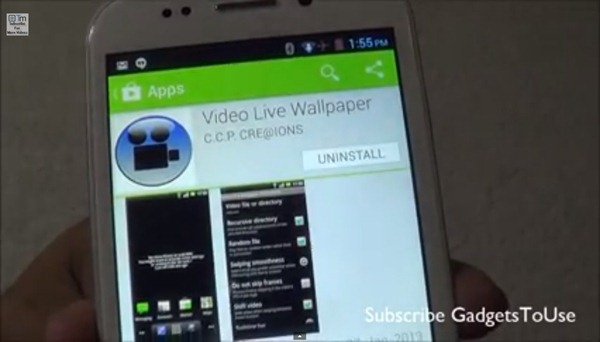
Search for ‘Video Live Wallpaper’ on the Play Store

The app we’re looking for is of the same name, by a developer called ‘C.C.P Cre@tions’. Download this. Go to your phone’s home screen after the app gets installed Touch and hold/menu->change wallpaper, and select ‘Live Wallpapers’ 


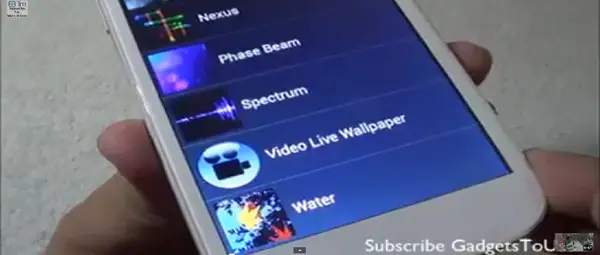
You will now see a new entry labelled ‘Video Live Wallpaper’. Touch this. Now, on the bottom left you will see the Settings button. Touch here and set your favourite video as your live wallpaper 


Source :- gadgetstouse


Read more ...

How to Change Country on the iTunes and App Store

Monday, May 26, 2014

For iOS device and Mac (and PC) owners, while the digital stores (App Store and iTunes Store) available on their devices offer an incredibly varied selection of apps and media, sometimes these are restricted to certain countries or have features available only in certain ones.
For example, movies available in the U.S. iTunes Store are available in English, while those available on Latin American iTunes Stores come in Spanish or with Spanish subtitles. Likewise, some companies make their iOS apps available only in their home territories, which will require you to have access to the stores from those countries.
This is exactly what we’ll show you today. So read along to learn how to change the country of the App Store or iTunes Store on your devices to download apps and media from them.
Important Note: The steps below can be performed on any iOS device, be it an iPhone, iPad or iPod Touch.

On Your iOS Devices

Step 1: Head to your iPhone’s Settings app, scroll down and tap on the iTunes & App Store option.


Step 2: The first thing you will see at the top of the next screen is your Apple Store ID (this might be different from your Apple ID if you set it up that way). Tap on it and then, on the Sign Outoption. This will get you completely out of the store on your iOS device.
App Store Apple ID  App Store Sign Out
Important Note: Even if you sign out of your country’s App Store and log into another’s, all the apps you downloaded with the previous account will remain on your iOS device.
Step 3: Now, head to the App Store on your iOS device and search for the app you would like to download. Try to download it and you will be prompted to either use an existing Apple ID or to create a new one. Select the latter.
App Store New App  App Store Create New
Step 4: On the following screen you will start your new account creation process by selecting your country of residence. Here, choose the country of the app you want to download. Then, agree to the terms and conditions.
App Store New Country  App Store Terms and Conditions

Step 5: Next, add an email address exclusive to that account. Remember that the same email address cannot be linked to two or more different iTunes Store accounts. So you might need to create a new one. Then add the password and fill up the rest of the required information.
App Store New Info  App Store Security
Step 6: On the next screen, when prompted to add a payment method, select ‘None’ from the the available options. Then verify your account from your email and head back to the App Store to start downloading.
App Store Payment Method  App Store Verify Email

On Your Mac

Step 1: Open iTunes and click on the iTunes Store button at the top left of the window. Once you access the Store, scroll down until the bottom and to the right, you will see the flag of the store’s country. Click on it.
ITunes iTunes Store
ITunes Current Country
Step 2: You will be taken to a new screen, where you will be able to select from various countries the one you want to download media from. Choose one and you will be taken to its storefront.
ITunes New Country
ITunes New Storefront
ITunes New Store
Step 3: To use the store though, you’ll have to log into it with your account details specific to that store. But you already have them thanks to creating a new account on your iOS device, don’t you?
ITunes Account Log In
ITunes Sign In
And that’s about it. It is definitely great that you can get content from other countries’ iTunes and App Stores almost without limitations, so make sure to take full advantage of this.

Source :- guidingtech
Read more ...

Diagrams :: Intro to an Org Chart Software

Monday, May 26, 2014

Diagrams are for visual illustration purposes and they simplify our lives. A single diagram can visualize & express million words. Diagrams are used in almost 97% of the industries at present. Form kinder garden junior to the computer level professional uses diagrams. Especially IT and management professionals use diagrams the most as they needed frequently. The age of drawing diagrams in a paper has changed with the revolution of computer software’s. At present, there are many diagram software’s in the market which helps to fulfill users need in various ways.

There are many types of diagrams such as UML diagrams (Unified Modeling, Language), Block diagrams, organizational charts, wire-frames, flow charts, Venn Diagrams, storyboards… etc. Organizations in modern world use diagrams for their business purposes. Mostly they use diagrams for planning and progress reporting purposes. In modern businesses, professionals use Gantt charts, fish-bone diagrams and org charts for planning stages. And for progress reporting they use different types of diagrams. Some examples are bar charts, pie charts, and scatter plots. Scatter plots are used for statistical purposes. Of all these diagrams beefiness use, org charts (organizational charts) are used for staffing.

Org charts or organizational charts show the higher-achy of a company or a company structure in summery. Org charts give human resource professionals and managerial level an idea of how the company should be organized, managed. Having a company organized is a critical task when managing a modern world business. That is not all; organizational charts can settle the gender balance in an organization. In other words human resource people can know the male: female ratio in a company and word towards balancing it. Organizational charts can also be used to identify key performers in a company. This helps in an organization to evaluate performance of the employees at the annual performance review. Organizational charts are used to determine the wage / salary differences too.

Professional’s in the field uses organizational chart softwares to draw these org charts. There are many commercial organizational chart software as well as free open source ones. Most professional bodies use commercial ones since they use them for business. If you are a business professional who uses diagrams more often I recommend buying commercial organizational chart software. There are org charts software matching your operating system, platform and need. For fly by users it is recommended to use online organizational chart software for simple org charts. Let’s do not forget that some people’s job is to draw diagrams. These professionals use specific software for their diagramming needs.

It is best to know about how to draw an organizational chart. Drawing an organizational chart is not hard. It is easier compared to many other diagrams. When drawing an organizational chart, you should first categorize the levels of your organization in terms of staff. For an example: managerial level, department level, section level and to the employee level. Below figure shows an organizational chart drawn from a org chart software.

After identifying the levels of your organization, it is time to draw them in separate levels of your diagram. Put CEO’s, presidents and directors to the top most level. Then start breaking down other entities such as managers, department heads and employee as branches in a tree. Entities should be in boxes and the upper level should point the level below from an arrow. Here is another organizational chart example of a small / medium level business. After drawing the diagram anyone should be able to understand how each level operates. It is easier to draw org charts from a organizational chart maker rather than using other graphical tools such as Photoshop or paint. If you are on windows or mac there will be plenty of tools available offline, but if it always better to use an online tool like Creately for drawing organizational charts.

489 Views

View the original article here

Read more ...

Log into your Mac Computer with your iPhone

Sunday, May 25, 2014

Knock to Unlock is a new iPhone app ($3.99) that lets you easily log into your locked Macbook using the iPhone in your pocket. While you are near your locked Mac, just know the screen of your iPhone twice and the app will automatically enter your password on the computer.
Knock has two components – the desktop app that runs on your Mac and the iPhone app. When you knock on the iPhone screen, the Mac app automatically enters your password and unlocks the computer. Your Mac is still protected with a password, the app just saves you from the hassle of typing that long password every time you sign-in.
And if your iPhone isn’t around, you will still be able to sign in to your Mac by manually typing the password.
Know to Unlock is currently available for Mac only but a Windows version is also in the works. You need an iPhone running on iOS 7 and not a very ancient Macbook or iMac running on Mountain Lion or Mac OS X Mavericks.
One iPhone can only be paired with one Mac computer though the website says that support for multiple Macs is coming very soon.

Source :- labnol
Read more ...

How to View your Old Notifications in Android

Sunday, May 25, 2014
There were a couple of pending notifications sitting in the status bar of your Android phone and you have just tapped the “Dismiss” icon to clear them all. And then it occurred that you may have dismissed certain important notifications. Where did they go? Can you retrieve the old notifications even if they have have removed from the notifications bar?
Well if your phone is running a more recent version of Android, Jelly Bean or later you can get a log of notifications that have pushed by various apps. Here’s how.
Go to your Android home screen and tap the apps icon. Switch to the Widgets tab, tap and hold the 1×1 Settings Shortcut and place it on your your home screen. Now select “Notifications” from the available choices.
Tap the settings icon that you have placed on the home screen and it will display the notification history in reverse chronological order. You will know the name of the app that pushed the notification, the title of the notification and the time when that message was pushed.

You may also use the notifications shortcut to prevent certain apps from sending notifications to your phone. Just tap the name of an app and deselect the option that says “Show Notifications” from the App info page.
Source :- labnol
Read more ...

Run JAR files on Android [ Install Jar on Android]

Saturday, May 24, 2014
There was a time that nokia was the phone that was reigning but it has been replaced by smartphones and some of us miss the apps we had on our nokia phones which for sure won't work on our android phones.
 As humans we all have the doubt like whether we can run jar files on Android or not, but now it’s possible with the application JBED.

What is JBED?

JBED is an .apk Android application which Run Java Games and Apps on Your Android Device. JBED is a Java Android Java Emulator, by using this application you can install .JAR/.JAD/Java/J2ME/MIDP games on Android phones. Now you can use all of your favorite .JAR application in your phones

Steps to Install Jar on Android:

Download JBED
Install JBED.apk in your Android Phone. Install JBED.apk is not different process. It also the same installation process like other Android applications.
Launch JBED application. Press menu button and choose SD card.
Select your .JAR/.JAD file that you want to install and run.
Now install the chosen application through JBED.
Now open the installed java application to run.

By this method we can run jar files on android phones. If you face any issue while installing JAR application then your mobile is not supporting fully. If you successfully install the JAR application also sometimes you will get some graphical and performance related issues.


JBED Errors

So many people has complaint that this JBED application is not working and throwing some errors in mobiles like orce Close” or ” Maybe no sd Card or SD card is busy errors.

Reason for the errors is JBED only works with below Android version 2.3.4.
How to avoid errors while using JBED application

You Android should be rooted with system manager or some other application.

Download libjbedvm.so and place in system\lib folder
Install the JBED.apk application and don’t play it.
Restart the phone, and try it .
Read more ...

Is Opera Mini the Fastest Mobile Browser for Android? [Mobile Browser Shootout]

Saturday, May 24, 2014
Nowadays people don’t carry a laptop everywhere they go but they do carry their Smartphones. The main reason for this change in trend is that they can still remain connected by accessing Internet on their smartphones. Internet has became an integral part of our day to day life and most of us can’t even imagine to spend 1 day without internet.
Browsing internet on our mobile phones can become a nightmare if you are using an outdated and slowbrowser. A mobile browser or often called as minibrowser is a web browser specially designed for mobiles. These browsers are optimized to display the web content more effectively on the smaller screens present on Mobile devices. But all mobile browsers are not equally good, some of them offer amazing browsing experience while others just make our browsing experience worst.

Opera Mini is considered to be the fastest mobile browser available for smartphones and claims to provide the best browsing experience in case you are on slower data connection(2G). Today we would be comparing various mobile browsers with Opera Mini and see is Opera Mini really the best mobile browser in terms of speed. We would only be comparing the Opera Mini with other mobile browsers which are available for the Android platform. So lets just check out which one would be best mobile browser if you are on 2G and want to surf the net on your Android Smartphone.

browser if you are on 2G and want to surf the net on your Android Smartphone.

Opera Mini

First of all lets have a look at the Opera Mini features. It is one of the oldest browser available for the Android mobile platform. It comes with a unique data compression capability which can reduce the size of a web page by up to 90% thereby saving your money on a limited data pack.
In case of Opera Mini there is a proxy server present between your mobile phone and the website. When you try to open any url the requests go via the Proxy server. On receiving the response from the Website the proxy server compresses the web page and then send it on your mobile. This makes the site to load faster on your device and also saves data usage. But compressing stuff also has its disadvantages like limited support for HTML5, flash and video content.

Test Time

Today we would be testing the loading time of various famous websites by using different mobile browsers on an Android smartphone. We would be comparing the Android Stock Browser, Opera Mini,Firefox, Chrome, Skyfire and Dolphin browser. We have installed the above mentioned browsers on the same Android device (Galaxy Note 2) and while running tests for a particular browser there would be no tasks/apps running in the background. After testing for 1 browser we would restart the device and then start testing the next browser.
So here are the results of the loading time test performed on various mobile browsers (all time is in seconds):

Above tests has very shocking results. We expected the Opera Mini to be fast but not so fast. The reason for this is the data compression being used by Opera Mini which makes it 2-3 times faster than other browsers in some cases. But everything you get comes for a cost. We browsed desktop version of the sites on each mobile browser but Opera Mini did not render the page as it was.
The image slider present on bbc.co.uk was also not working on opera mini. If you try to access the second image of the slider on Opera Mini a page load occurs thereby indicating that those images were not loaded but in case of other browsers every image of the slider loads on the first request made to the server and hence have more loading time.
While browsing the sites on other mobile browsers one thing which we noticed was that these browsers loaded the web page almost fully even though the progress stayed at 90%. We guess there were few footer scripts which were being loaded at the end of page. In case of Opera Mini these scripts are removed while rendering the page thereby providing a faster browsing experience but degrading the quality of the webpage like distorting the image slider.
Same was the case with other sites which were browsed on these browsers except the listthemout.com. It did not have any special scripts, sliders or other things which could be removed or compressed while rendering the page. Therefore the loading time of this site was nearly the same on all mobile browsers.

Conclusion

Undoubtedly Opera Mini is the fastest mobile browser available for the Android Smartphone. You should definitely go for it if you can wait too much for a web page to open or you are using a pay as you go data pack where you want to keep your data usage minimum. But if you are looking for a mobile browser which is fast but at the same time does not degrade the quality of web page like distorting the image slider you should go for Chrome.

Source :- listthemout


Read more ...

How to Find the Email Address of a Person

Friday, May 23, 2014
You are sending an email to an old friend but you aren't too sure if the email address that you just entered into the compose window is correct or not?
There are numerous ways to find someone’s email address.
For instance, you may search any old correspondence with that person in your mail archives, use a people search engine (like Pipl), use the WHOIS data of that person’s website or, if nothing works, search for that person’s name on Google (include the @ symbol in quotes) and you may sometimes find their email address in the search results.

How to Find Someone’s Email Address

There’s however a better way. You can guess a few addresses and then use LinkedIn’s Rapportive add-on for Gmail to verify if any of your guesses point to the right person or not.
Go to your Gmail inbox, compose a new message and enter the email address that you have guessed. Now hover your mouse over the address and Rapportive will show a list of various social profiles – Facebook, Twitter and LinkedIn – that are associated with the email address.
If you are to recognize a profile in the social results, you can be pretty much sure that your guess was correct. If no social results are found for that email address, it means either that email address doesn’t exist, or the person doesn’t have a social presence or they could have associated a different email address with their social profiles.

Rapportive is available for Chrome, Firefox and Safari and you’ve to have a Gmail account to use this tool.


Source :- labnol
Read more ...